SUBLO SUPPORT
How can we help?
Setup, troubleshooting, purchases, and privacy questions.
Email SupportUse SUBLO in Safari
SUBLO works on search pages opened in Safari. It cannot add Hide buttons inside the separate Google, Yahoo! JAPAN, Bing, or DuckDuckGo apps on iPhone or iPad.
Quick setup
- Open SUBLO once and complete onboarding.
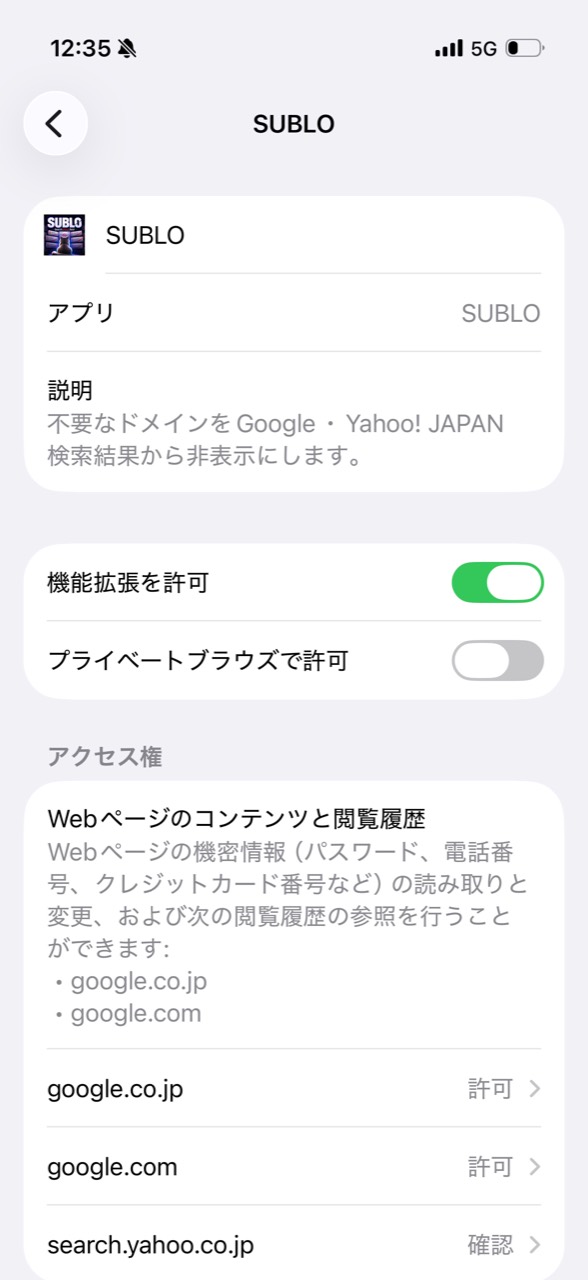
- Open Settings → Apps → Safari → Extensions → SUBLO.
- Turn on Allow Extension.
- Under website access, change each search site from Ask to Allow.
- Open the search engine in Safari and reload the results page.
Common questions
Can I use the Google or Yahoo! JAPAN app?
No. iOS does not let a Safari extension add controls inside another company’s app. Open Google, Yahoo! JAPAN, Bing, or DuckDuckGo in Safari instead. A website added to your Home Screen may also work when it opens with Safari’s web-extension support.
Hide buttons do not appear
Open SUBLO once, then go to Settings → Apps → Safari → Extensions → SUBLO. Turn the extension on and change each supported search site from Ask to Allow, then return to Safari and reload the results page.
A blocked site appears again
Open Blocked Sites and confirm the normalized domain is active. If you use iCloud sync, allow a little time for Apple’s asynchronous synchronization.
Restore a purchase
Open SUBLO → Plan → Restore Purchases while signed in to the Apple Account used for the original purchase.
Manage or cancel a subscription
Open the App Store, select your account, then Subscriptions. Apple manages billing, renewal, and cancellation.
CONTACT
Still need help?
Operator: Takahiro Aminaga
Include your device model, OS version, and SUBLO app version. Please do not send search history or sensitive page content.
日本語サポート
Safariから検索してください
SUBLOはSafariで開いたGoogle・Yahoo! JAPAN・Bing・DuckDuckGoに対応しています。iPhone・iPadの各検索アプリ内には「非表示」ボタンを追加できません。
セットアップ方法
- SUBLOを一度開き、初期設定を完了します。
- 「設定」→「アプリ」→「Safari」→「機能拡張」→「SUBLO」を開きます。
- 「機能拡張を許可」をオンにします。
- アクセス権に表示される各検索サイトを「確認」から「許可」へ変更します。
- Safariへ戻り、検索結果を再読み込みします。
購入の復元は、SUBLOの「プラン」画面から「購入を復元」を選択してください。
お問い合わせ:amipharmacy2020@gmail.com